+1 (571) 354 8500Free Audit

Every homeowner sees where their install stands

A pizza tracker for solar projects: your own phases and steps, in your words, in an app with your name on it.

  • Fewer status calls: homeowners check the tracker instead of calling your office

  • Moves with your CRM, so nobody retypes an update

  • Updates on autopilot by email, text and push

Tony LostraccoJoe BennettConor DarbyJohn GaffiganLloyd LeeMichael GibsonKeith GibsonMark DicksonFortunat Mueller

Sunvoy is rated 5/5 stars by hundreds of solar installers like you

Aurelia SolarnowYour project moved to the next stepInstall confirmation: see what to expect on install day.
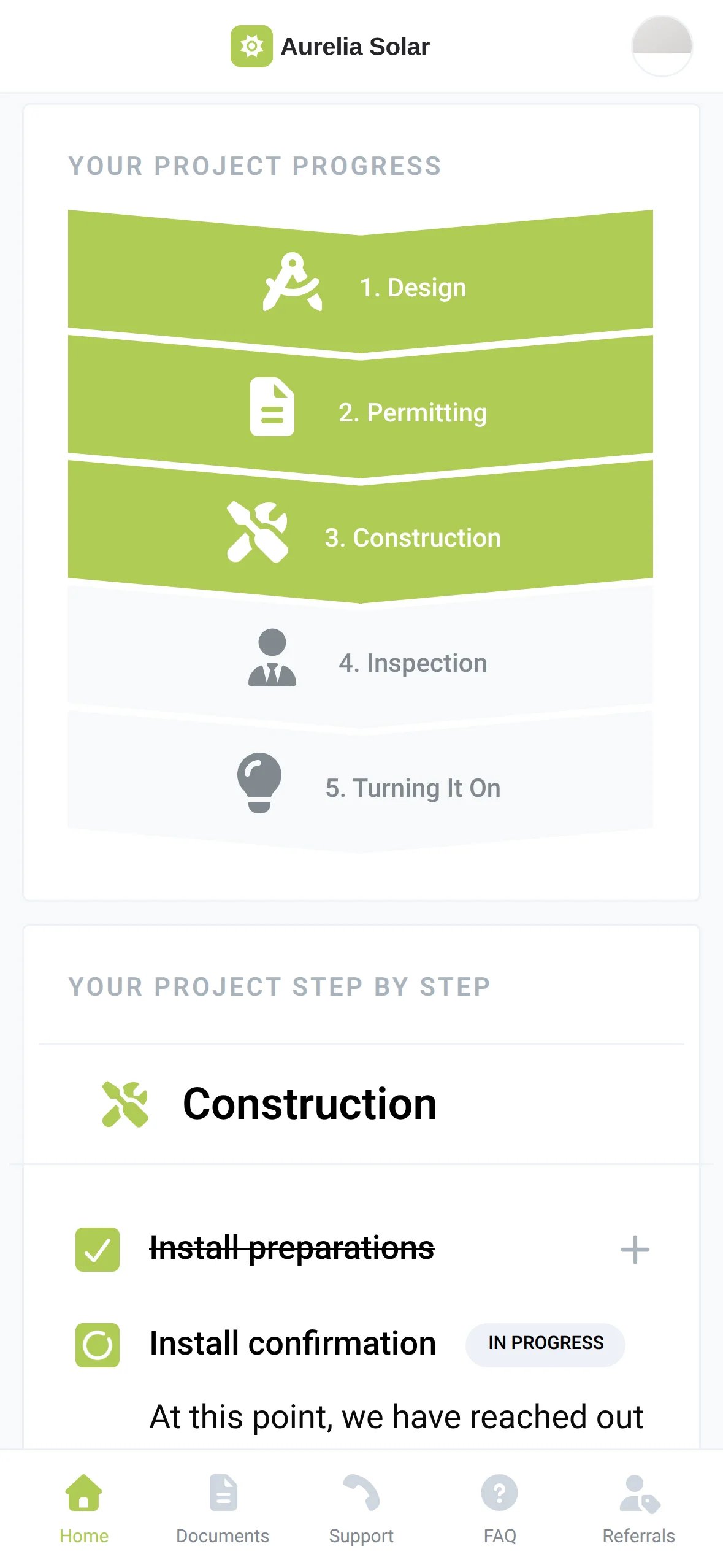
The Aurelia Solar app with the phases Design, Permitting and Construction done and Inspection and Turning It On still ahead
Synced from your CRMConstruction · Install confirmation
How it works

Update your CRM once. Everyone sees it.

Your project managers already move deals in your CRM. Sunvoy picks up every change and updates the homeowner's tracker on its own, usually within seconds.

1 · Your CRM

Patel Residence

Deal stageInstall preparationsInstall scheduled

2 · Sunvoy

Mark this step complete if:

Deal stage is Install scheduled

Construction · Install confirmation

3 · Everyone

  • The homeowner's trackerConstruction lights up and the new step opens with your description.
  • An email, text or pushYour project moved to Install confirmation.
  • Your team's boardThe card shows the new step in the Construction column.Patel ResidenceInstall confirmation

Works with HubSpot, Salesforce, Zoho, NetSuite, JobNimbus, Pipedrive and the other CRMs on our integrations page.

See all CRM integrations

No CRM yet? Run your projects in Sunvoy CRM.

Meet Sunvoy CRM
Steps that change the app

The app grows with the project

Your app shows homeowners what matters right now. Reviews come early, production and your shop once the system is ready, and the maintenance contact once it is turned on.

  1. Site Survey

    Reviews widgetAsk for a review while the first visit is fresh.
  2. Ready for Inspection

    Energy monitoringProduction appears once this step is done and an inverter is connected.
    Your shopBatteries, EV chargers and cleaning, offered when the system is in place.
  3. Permission to Operate

    Maintenance managerThe maintenance contact replaces the project manager on the home screen.
    Tracker steps asideThe phases hide and the home screen leads with production.
Homeowner view

What homeowners see on their phone

Homeowners always know what is happening now, what they need to do and what comes next, explained in your words, not in construction jargon. Their project manager is always one tap away.

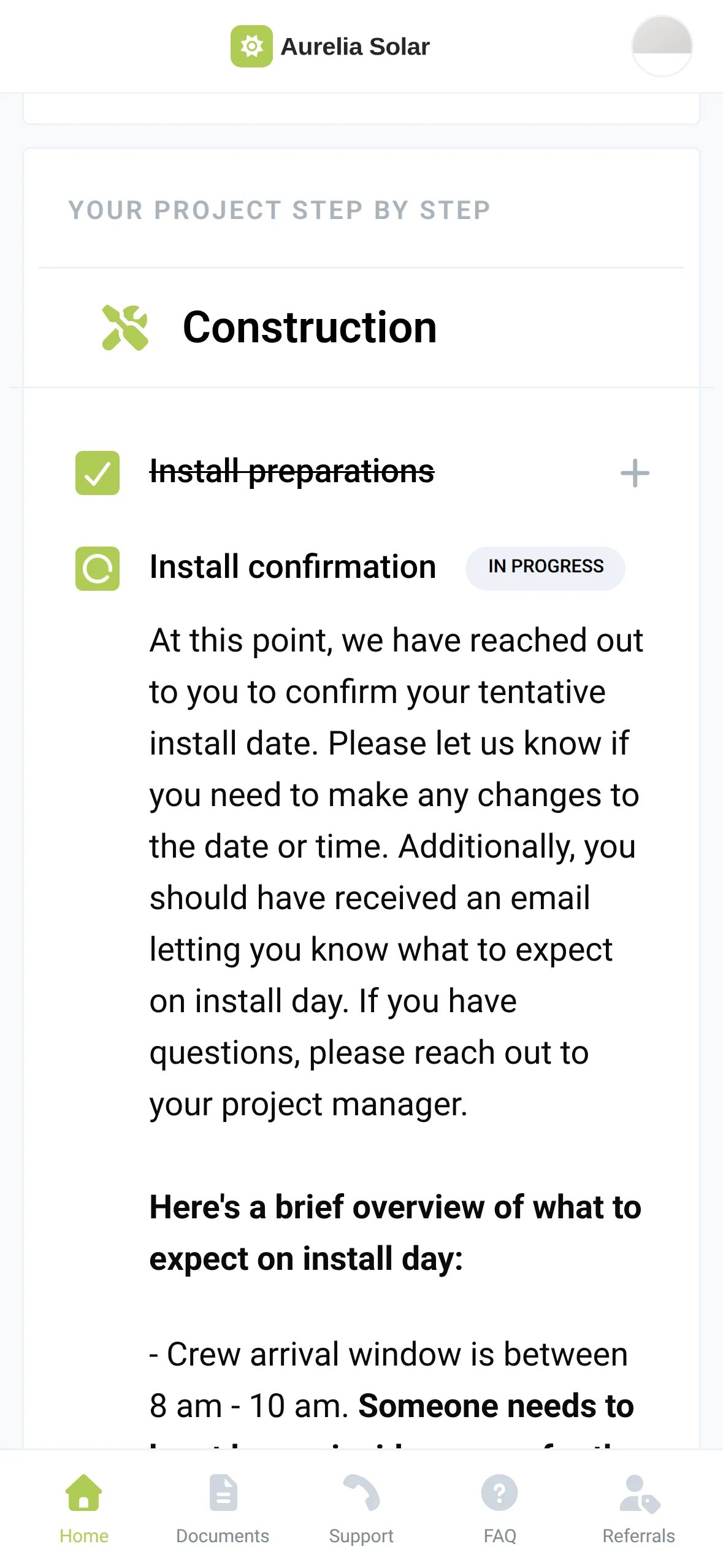
The Aurelia Solar app in the Construction phase: Install preparations checked off and Install confirmation in progress with a description of install day
  1. 1The phase the project is in
  2. 2Done steps are checked off
  3. 3The current step opens by itself
  4. 4Tap + to read any other step
Status updates

Status updates that go out on their own

Every step can send an email, text or push message you wrote, under your own brand and at an hour that suits the homeowner. Set it up once with one click, and your homeowners stay informed on autopilot.

app.example.com/settings/automations
Install confirmation - NotificationActive

Trigger

Project Construction Step changed to

Install confirmation
Send an emailto associated customers of this project
Delay until a time of day9:00 am · Recipient's local time
Send a text messageto associated customers of this project
Your team's view

Every project by phase, on one board

See every project by phase on one board, with the current step on each card. Open any project to see exactly what its homeowner sees.

app.example.com/sites
The Sites board with the Construction, Inspection and Turning It On columns, each card showing its current step
app.example.com/site/info
A project in Sunvoy with its phase icons, the line Construction · Install confirmation and the Change step button
Where it is going

What comes next for project tracking

What we are building next for project tracking. Tell us which ones matter for your projects.

A tracker for each project type

Waitlist

Run different phases and steps for residential, commercial and service projects, each with its own CRM mapping. Sunvoy picks the right tracker from the project in your CRM.

Project TrackersAdd a Tracker
  • ResidentialDefault5 phases
  • CommercialSelected by a filterUse this tracker when: Pipeline is Commercial6 phases
  • ServiceSelected by a filterUse this tracker when: Pipeline is Service3 phases

An estimated install date

Waitlist

Sunvoy records when each step is done, shows how long projects take from sold to finished, and gives homeowners an estimate based on your own history.

Estimated install
In about 6 weeksBased on similar projects
Average time per phaseDesignPermittingConstructionInspection

Frequently Asked Questions

Get answers to the most common questions and objections about Sunvoy's platform and capabilities.

No. The tracker reads each project's stage from the CRM you already use, such as HubSpot, Salesforce or Zoho. Your CRM stays the record for every deal, and Sunvoy shows homeowners where their project stands.

Explore more

Built to work together

Give every homeowner a tracker they trust

Book a demo and see your own phases and steps in a homeowner app with your name on it.