+1 (571) 354 8500Free Audit

Sell to the customers who already trust you

Double your revenue by selling panel and battery upgrades through your own eShop

  • Set up products with one click: batteries, EV chargers, panel cleaning, critter guards and more

  • Take in leads for your sales team to process

  • Take in payments for deposits, one-off or recurring purchases

Tony LostraccoJoe BennettConor DarbyJohn GaffiganLloyd LeeMichael GibsonKeith GibsonMark DicksonFortunat Mueller

Sunvoy is rated 5/5 stars by hundreds of solar installers like you
After Permission to operate

Your next sale starts when the install is complete

A solar-only customer can still buy a battery, an EV charger, a critter guard, a cleaning and a service plan from you. Most of them don't know you sell any of it. The eShop reminds them every time they open your app to check on their energy production.

Your customer's systemOnline, monitored, in your app
There may be more dollars left on the table after PTO than sold before PTO.
Joe MarhamatiCo-founder of Sunvoy
PTO
Add a battery
Add an EV Charger
Add more Solar Panels
Schedule a Cleaning Service
System Health Check
Add a Critter Guard
Need a new roof?
Removal and Reinstall
Your protection plan
Homeowner app

Your shop one tap away

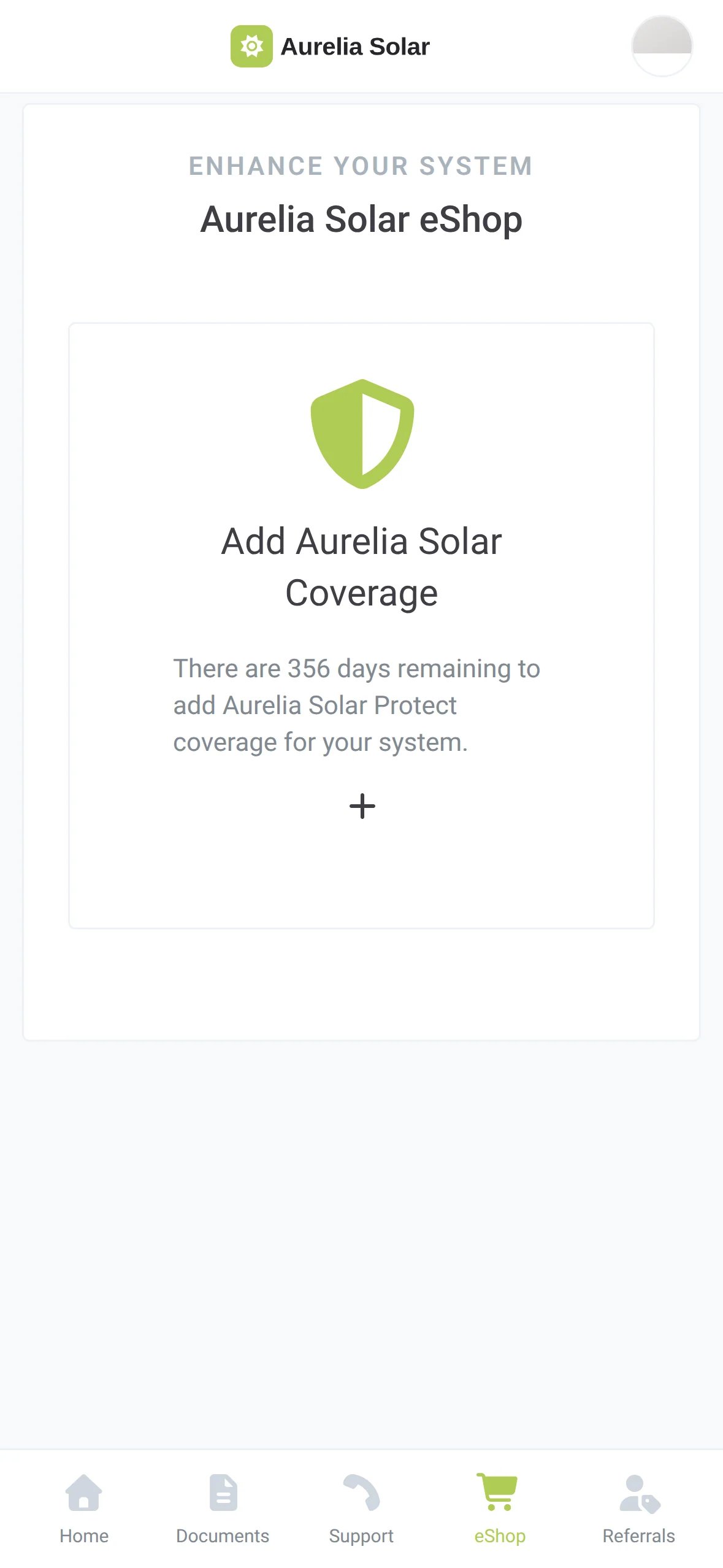
The eShop lives in your branded customer app, next to their energy production, important documents and service tickets. Homeowners pass it every time they check their production, open a document or ask for help.

The eShop tab in the homeowner's Aurelia Solar app, showing the Add Aurelia Solar Coverage card and the eShop item in the bottom navigation
Your protection plan offer in the eShop tab
A product right after the customer asked about it

Your name in the menu

Call it eShop, Upgrades or anything you like. The label in the customer navigation is yours to set.

Prevent change orders

Choose a project milestone at which the eShop appears, so a customer still waiting in permitting does not see a battery offer.

Your products, your words

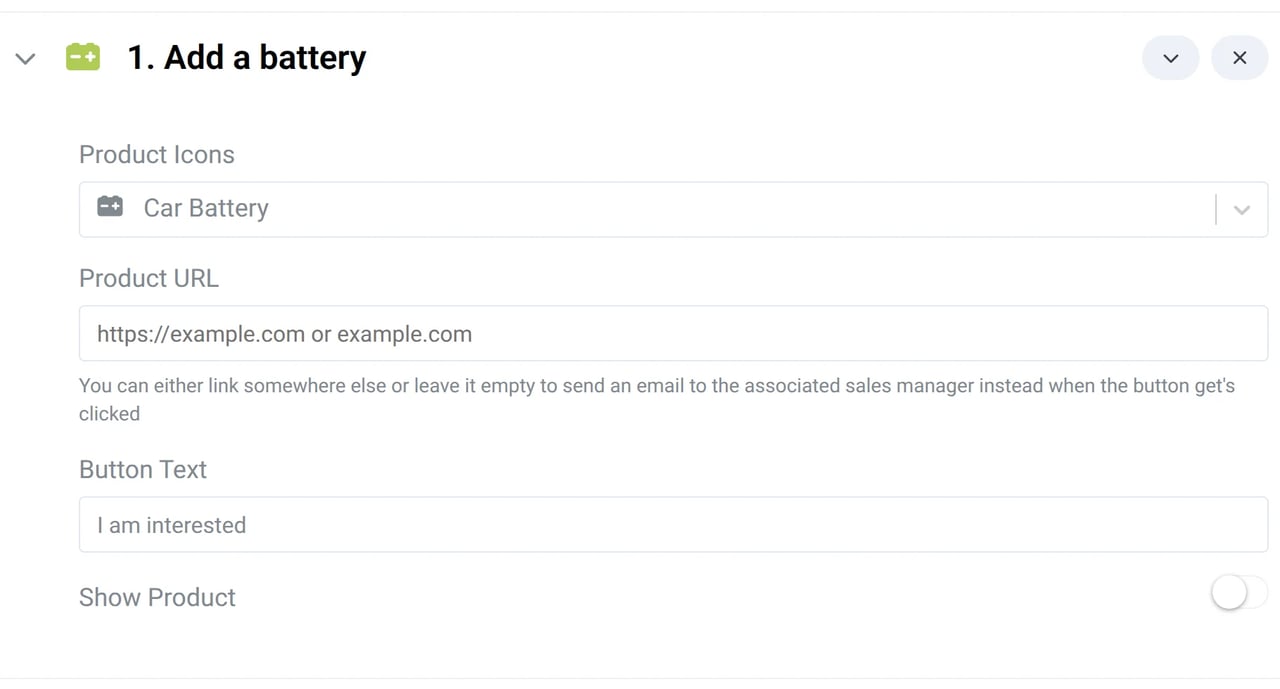
Each product has its own icon, price line, description and button text completely customizable for your team.

Live when you are ready

Products stay hidden until you switch them on so you never sell something you don't offer.

Checkout

Let customers buy on the spot

You can accept real credit card and ACH payments through your own shop. The customer pays on a secure payment page with your logo, the payment gets processed through Stripe and sent to your bank account.

One-off or recurring

Charge once for simple products, or bill a subscription monthly or yearly for service plans.

Card or bank transfer

Credit card and ACH. Set the processing fee per method, or choose where each payment method is allowed, to optimize fees.

Your name on the receipt

You set the price and the name shown on the receipt. Sunvoy never appears.

See Sunvoy PaymentsCollect invoices, sell add-ons and run subscriptions from the same Stripe account.
Easy to set up

Your whole shop in one sitting

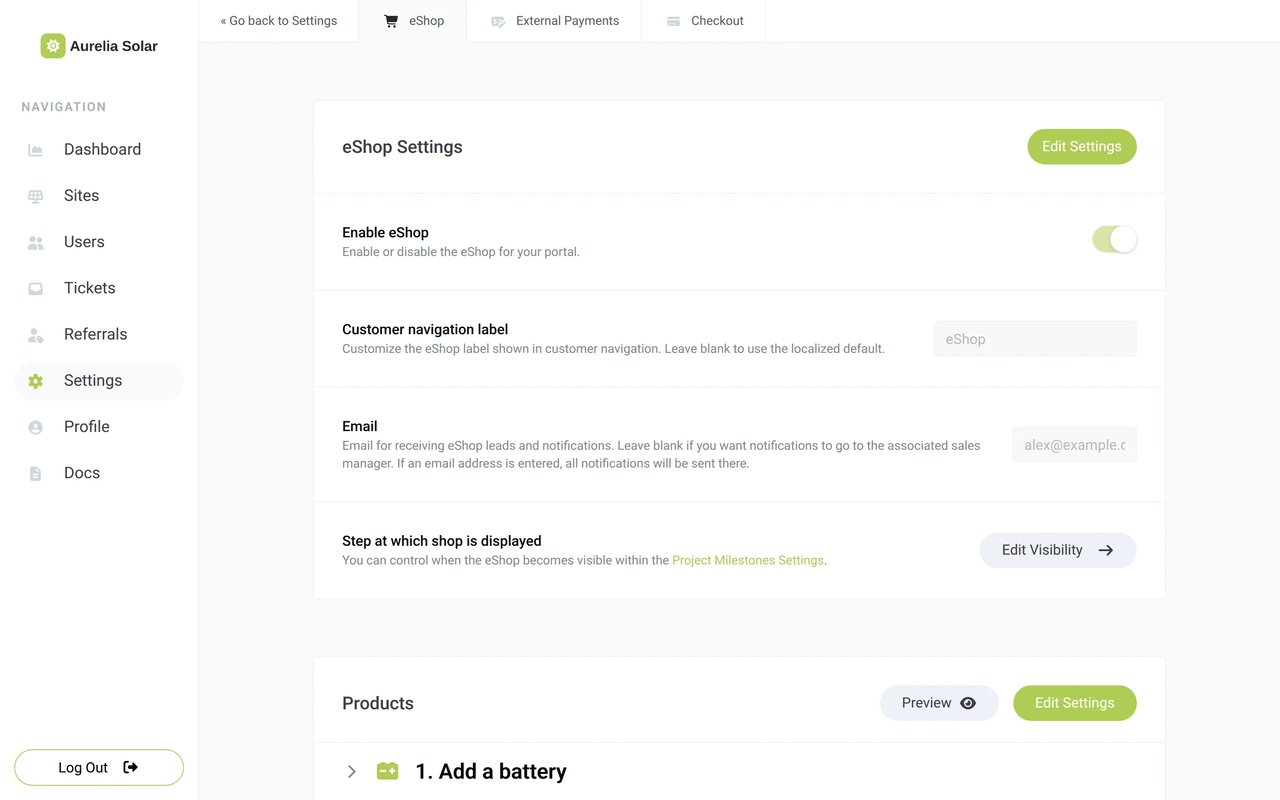
Just switch the shop on, add a customizable set of default products, adjust them and decide who gets the new leads. Then preview the shop the way your customers will see it.

app.example.com/settings/payments/eshop
The eShop settings in the installer's Sunvoy account: Enable eShop, Customer navigation label, Email for eShop leads, Step at which shop is displayed, and the start of the product list
The product editor for Add a battery: Product Icons, Product URL, Button Text I am interested, and the Show Product switch
Proof

Your installed base is already your market

142eShop leads for a single installer

Leads that a Sunvoy installer received from their eShop after promoting it.

11,000battery opportunities at Mycrogrid

Solar-only customers in Mycrogrid's fleet, each one a candidate for a battery.

Sunvoy opened up to me 11,000 new opportunities to do the right thing and add batteries so we have closed loop microgrid systems. You did that. Your app does that.
VincentCEO, Mycrogrid, on the What Solar Installers Need to Know podcast
Protection plans

Sell your own protection plans or active monitoring services

Add different plan tiers, each with its own price, recurring billing and benefits. Customers can compare them in the eShop and buy the one they want. Your plan also gets its own landing page you can promote independently.

app.example.com/eshop

You define the tiers

Name, description, benefits, visibility and price for each tier. Start with Silver, Gold and Platinum or give it your own spin.

Monthly, yearly or one-off

Every tier has its own checkout price and billing interval.

Your guarantees in the shop

Show your workmanship, roof and equipment guarantees and their conditions above the plan tiers.

See service plansTurn your protection plan into recurring revenue.
Where it is going

From one product to a full order

Today a customer asks for a quote or buys one product or plan at a time. Next, the eShop gets a cart, financing at checkout and plans that switch services on.

A cart for several items

Waitlist

A customer adds a battery, a critter guard and a health check, then pays once for the whole order.

Your cartExample
  • Add a batteryQty 1
  • Add a Critter GuardQty 1
  • System Health CheckQty 1
3 itemsCheck out

Financing at checkout

Waitlist

Offer monthly payments on bigger upgrades such as a battery, as one more way to pay in your checkout.

Pay withExample
Add a batteryCredit cardBank transfer (ACH)Monthly paymentsSpread the cost over monthly payments

Frequently Asked Questions

Get answers to the most common questions and objections about Sunvoy's platform and capabilities.

No. Without checkout, every product collects a request: the customer taps your button, your team gets an email and a lead. Switch on checkout when you want customers to pay in the app.

Explore more

Sell more to the customers you have

Turn the app your customers already use into your shop

See how Sunvoy's eShop brings requests and payments from the customers you already have.